GeoCaptions vs CapCut for Georgian captions
No, CapCut cannot make Georgian captions from speech automatically: Georgian is not in the language list of its auto-captions (we checked in the app on 24 October 2026). In CapCut you can type your captions by hand, or import a subtitle file on its desktop and web versions. GeoCaptions makes the Georgian captions from your video's speech, in about 13–33 seconds for each minute of video, and gives you the video with the captions burned in, or an SRT file that you can import into CapCut. Free to try, no card needed.
GeoCaptions and CapCut, side by side
| GeoCaptions | CapCut | |
|---|---|---|
| Georgian captions made from the speech, automatically | Yes | No: Georgian is not in its auto-caption language list (checked in the app on 24 October 2026) |
| Type the captions by hand | Yes: every word can be edited, and the video is updated in seconds | Yes |
| A subtitle file (SRT) | Makes the SRT for you (also VTT and plain text) | Can import one, on its desktop and web versions |
| Words checked against a Georgian dictionary | Yes, 510,000 words | Not offered, as far as its pages say |
| Fonts tested for every Georgian letter | Yes | Not offered, as far as its pages say |
| Captions burned into the video, in 12 looks | Yes | Not compared here |
| A full video editor (cuts, music, effects) | No: it makes the captions, and can turn a wide video into a vertical one | Yes, that is what CapCut is |
| Price | Free to try; from ₾19 a month | Not compared here: see CapCut's own pages |
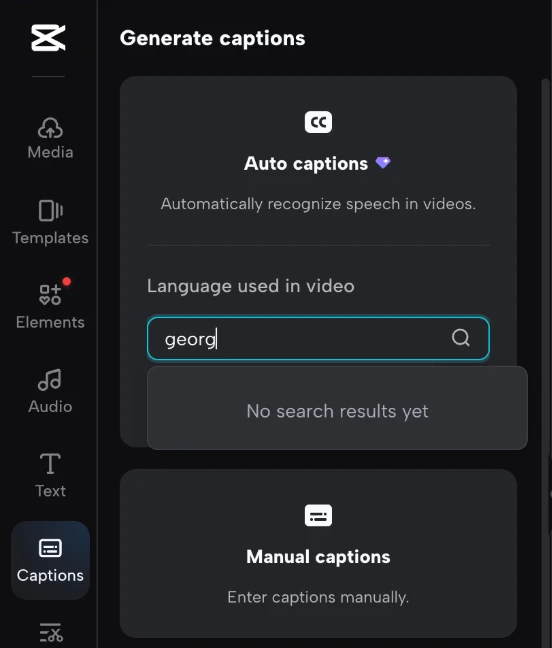
Checked on 24 October 2026 in the app and on 25 October 2026 in the web editor (the picture above): CapCut's auto-caption language list. The rest of what we say about CapCut is what its own pages show; where we could not find a feature on them, the table says so. CapCut changes from time to time; tell us if something here is out of date.
When to use which
- You edit the whole video in CapCut and have only a few lines of text Type them in CapCut. You need no other tool.
- You edit in CapCut, but the video is long or full of talking Let GeoCaptions make the Georgian captions, download the SRT and import it into CapCut, then finish the video there. Typing every line yourself takes much longer.
- You want finished captions and no editor Download the video from GeoCaptions with the captions burned in, in one of the 12 looks, and post it.
- You need cuts, music, effects or several clips together Use CapCut, or any editor. GeoCaptions is not a full editor and does not try to be one; it makes the captions, and for editing software also a transparent caption overlay.
How to bring Georgian captions into CapCut
- Add your video to GeoCaptions. A file from your phone or computer, or a link (YouTube, Google Drive, Dropbox). Press Add captions.
- Check the marked words. The editor points at the words most likely to be wrong; fix them.
- Download the SRT file. It is the Georgian captions with their times.
- Import it in CapCut. On CapCut's desktop or web version, import the subtitle file into your project. Its menus change, so follow CapCut's own help for the exact buttons. We only speak about the desktop and web versions here.
Questions people ask
Does CapCut make Georgian captions?
Not automatically. When we checked in the app on 24 October 2026, Georgian was not in CapCut's auto-caption language list. That is the one thing about CapCut we checked ourselves. CapCut can change, so look at its language list yourself if it matters.
Can I still put Georgian captions on a video in CapCut?
Yes, in two ways: type the text by hand, or import a subtitle file (SRT) on CapCut's desktop and web versions. GeoCaptions makes that SRT file from your video's speech, so you do not type it yourself.
How do I bring GeoCaptions captions into CapCut?
Add the video to GeoCaptions, press Add captions, fix the marked words and download the SRT file. Then import it in CapCut's desktop or web version. You can also download a transparent caption overlay for editing software, or the video with the captions already burned in.
Is GeoCaptions better than CapCut?
They do different jobs. CapCut is a full video editor; GeoCaptions makes captions. We have not tested the quality of CapCut and do not rate it. The one difference we checked is that CapCut has no automatic Georgian captions and GeoCaptions has. Many people can use both: captions from GeoCaptions, the rest of the editing in CapCut.
How accurate are GeoCaptions' Georgian captions?
Measured on the FLEURS Georgian test, about 8 words in 100 are wrong with clean speech; more with noise. GeoCaptions marks the doubtful words, and you fix only those. We have no number for CapCut, because it does not make automatic Georgian captions, so this page does not compare accuracy.
Is GeoCaptions free?
You get 3 minutes of captions a month free, with a watermark and at 720p, no card needed. Paid plans start at ₾19 a month, without the watermark and at 1080p. Prices are in lari; a video that fails gets its credits back. CapCut's own prices are on CapCut's pages.
Try it on your next video
3 free minutes a month; no card, nothing to install. More: automated Georgian captions, and how it compares with YouTube's auto-captions.